The Dark Web is a small, hidden part of the Internet that can only be accessed with specialized software, such as the TOR Browser. It may have a reputation for crime, but it is also used every day by journalists, activists and ordinary people who simply want privacy and freedom of speech.
In this guide we walk you through it one step at a time: what the Dark Web actually is, how the technology behind it works, who uses it and why, where the dangers are, and how investigators fight the crime that happens there. If you decide to look for yourself, Step 6 gives you a practical checklist for doing it safely.
You don't need a technical background. If you can use a web browser, you can follow this guide.
Step 1: Know the three layers of the Internet
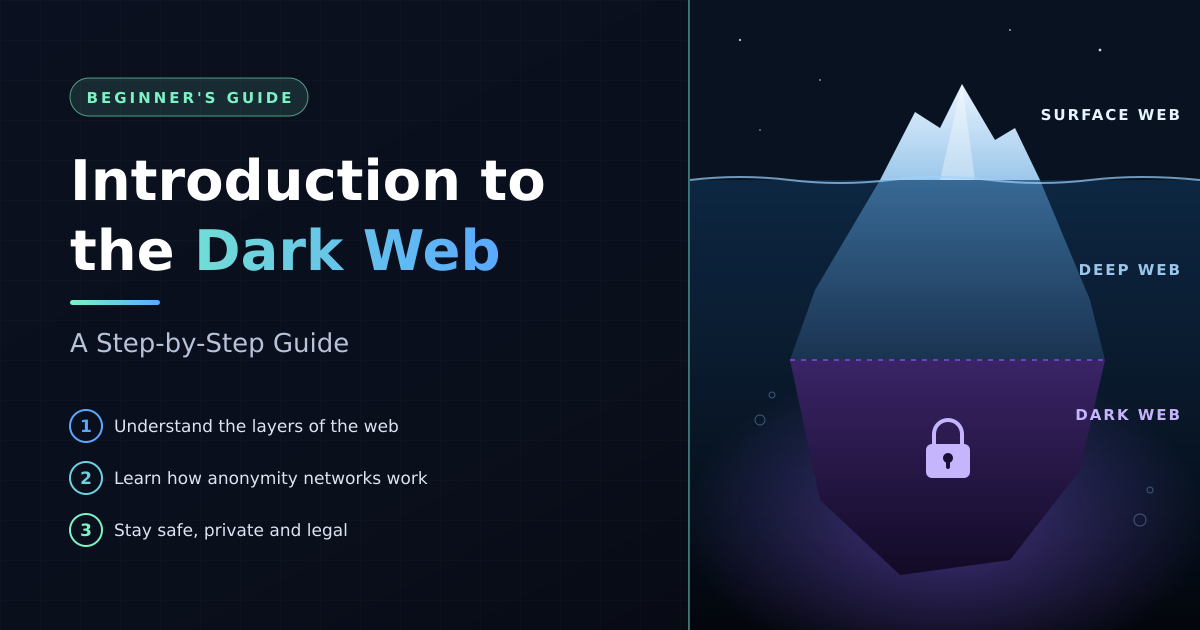
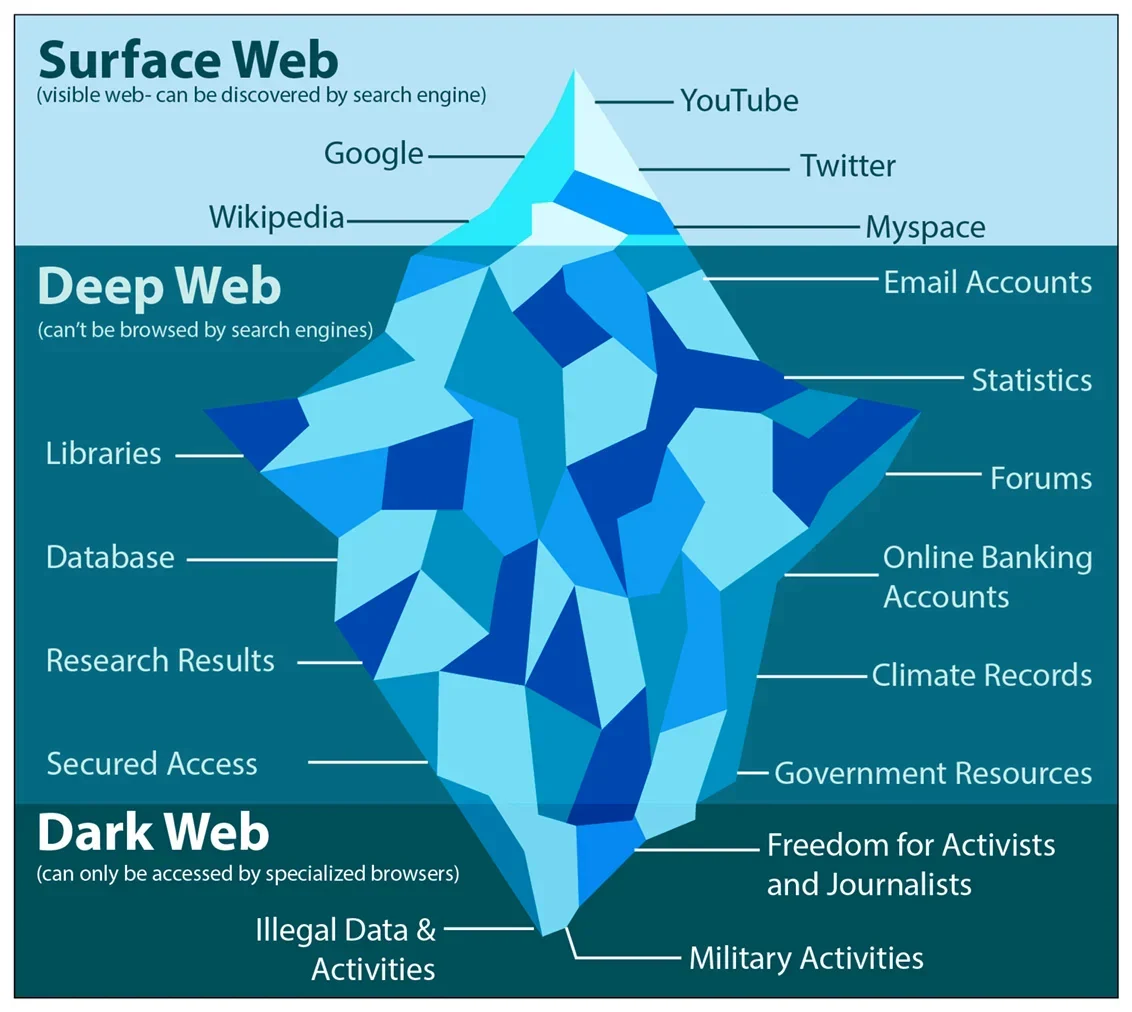
People often picture the Internet as an iceberg. What you see above the water is only a small part of it.
The Deep Web and the Dark Web are often confused, but they are very different. The Deep Web is the biggest part of the Internet and it is completely ordinary: every time you check your email, browse through social media or doing online banking you are using it. Pretty much anything that requires username and password to access.
The Dark Web is a tiny, deliberately hidden corner built for anonymity and privacy.
Step 2: Understand how TOR hides your identity
TOR stands for "The Onion Router". The name comes from its main idea: your traffic is wrapped in several layers of encryption, like the layers of an onion, and each layer is peeled off at a different stop along the way.
When you open a website in the TOR Browser, your connection doesn't go straight to the site. It travels through at least three volunteer-run computers, called relays, chosen at random:
- Guard relay. The entry point. It knows who you are (your IP address) but not where you're going.
- Middle relay. It only knows the guard before it and the exit after it. It knows neither you nor your destination.
- Exit relay. It sends your request out to the normal website. It knows the destination but not who you are.
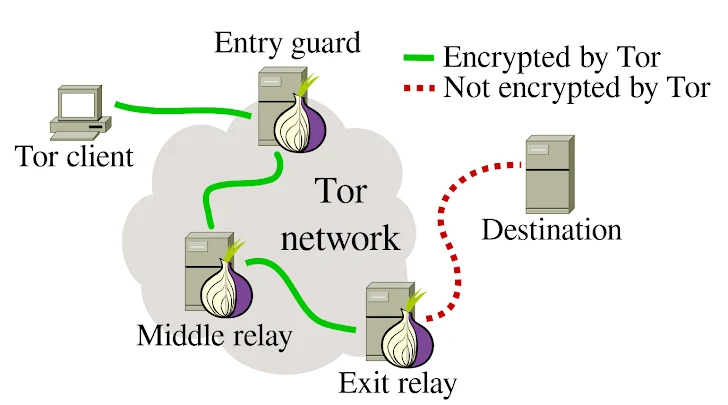
Because no single relay knows both who you are and what you're visiting, it is very hard to link the two. That is what makes TOR anonymous.
What about .onion sites? Dark Web sites end in ".onion" instead of ".com". These are called onion services. With an onion service, the traffic never leaves the TOR network at all: you and the site each build a circuit and meet in the middle. This hides the site's location as well as yours, which is why onion services are so hard to trace and shut down.
Step 3: Learn where the Dark Web came from
The Dark Web wasn't built by criminals. Onion routing was developed in the mid-1990s by researchers at the US Naval Research Laboratory, to protect government communications online.
There was a catch: an anonymity network used only by the government would make every user easy to spot. For the anonymity to work, the network needed lots of ordinary users too. So the code was released to the public, and in 2006 the non-profit TOR Project was founded to develop and maintain it.
The Dark Web's criminal reputation grew in 2011, when Silk Road launched as an anonymous marketplace for drugs, paid for in Bitcoin. The FBI shut it down in 2013, but many copycat markets followed. Since then, the story of the Dark Web has been a cycle of new markets opening and law enforcement taking them down.
Step 4: See who uses it for good
Using TOR is legal across the EU and in most of the world, and most people on it aren't doing anything wrong. Some of its most important users are:
- Journalists and their sources. Many newsrooms run secure drop boxes on onion services, so whistleblowers can share documents without revealing who they are.
- People living under censorship. In countries that block news sites or social media, TOR lets people read and speak freely.
- Activists and human rights workers, whose safety can depend on not being tracked.
- Survivors of abuse or stalking who need to stay hidden from someone watching them.
- Ordinary people who value privacy and don't want advertisers or Internet providers following everything they do.
Even well-known organisations run official .onion versions of their sites so that people in restrictive countries can reach them. Facebook, the BBC and The New York Times all do.
Step 5: Recognise the criminal side
The same anonymity that protects a journalist also protects criminals. These are the main types of crime you'll find on the Dark Web:
- Marketplaces. Sites that look like normal online shops but sell drugs, weapons, fake documents and hacking tools, usually paid for in cryptocurrency.
- Stolen data. Credit card numbers, login details and full identity packages taken in data breaches are bought and sold in bulk.
- Ransomware leak sites. Ransomware gangs publish data stolen from companies that refuse to pay, to pressure their next victims.
- Hacking and fraud forums, where criminals trade techniques, recruit partners and sell services.
- Child abuse material and human trafficking, the most harmful crime on the Dark Web, and a top priority for police worldwide.
A lot of Dark Web crime targets other Dark Web users. Fake shops take payment and never deliver, "escrow" services disappear with the money, and criminal markets regularly shut down overnight in what are called exit scams. If something on the Dark Web looks like a deal, assume it's a trap.
Step 6: Explore safely, if you choose to
You don't have to visit the Dark Web to understand it. If you do want to see it for yourself, the rules below will keep you on the safe and legal side.
Before you connect
- Download the TOR Browser only from the official site, torproject.org. Fake versions bundled with malware are common.
- Keep it updated. Install updates as soon as they come out; they fix security holes.
- Raise the security level. In the browser's settings, choose "Safer" or "Safest". This switches off features, such as some JavaScript, that attackers use to identify visitors.
- Don't install add-ons or plugins. They can leak your identity and make your browser stand out from everyone else's.
While you browse
- Never log in to your personal accounts or type your real name, email address or phone number.
- Don't download files, and never open them while online. Documents such as PDFs and Word files can contact the Internet when opened and reveal your real IP address.
- Don't use file-sharing (torrent) apps over TOR. They can bypass TOR and expose you.
- Be careful with links. Onion addresses are long strings of random characters, and scammers create look-alike copies of popular sites. Only use addresses from sources you trust.
- Never buy anything. Beyond the legal risk, you're far more likely to be scammed than to receive what you paid for.
If you come across illegal content
Close the page straight away, don't download or share anything, and report it to the police.
For people who face serious risks, such as journalists or activists, the TOR Project also recommends Tails: an operating system that runs from a USB stick, sends everything through TOR and leaves no trace on the computer.
Step 7: See how investigators fight back
Anonymity on the Dark Web is strong, but it isn't perfect. Criminals make mistakes, and investigators have become very good at finding them. Their main methods are:
- Open-source intelligence (OSINT). Investigators collect clues that are publicly available, such as a username reused on a normal forum or an email address left in old posts, and link them back to a real person.
- Following the money. Bitcoin isn't truly anonymous. Every transaction is recorded on a public ledger, and specialist tools can trace payments to the exchanges where criminals cash out.
- Undercover work and sting operations. Officers pose as buyers, sellers or even site administrators to gather evidence from the inside.
- Honeypots. Police set up, or quietly take over, sites that look criminal in order to identify the people who use them.
- Search and analysis tools. Programs such as DARPA's MEMEX were built to search and map the Dark Web in ways ordinary search engines can't.
These methods work. In 2017, police took down AlphaBay, then the largest Dark Web market. At the same time, Dutch police secretly ran another market, Hansa, for about a month, collecting evidence on its users before shutting it down. In 2024, an international operation took over the leak site of LockBit, one of the most active ransomware gangs.
Key takeaways
- The Dark Web is a small, hidden part of the Internet, reached through tools like the TOR Browser.
- TOR protects you by sending your traffic through at least three relays, so no single one knows both who you are and where you're going.
- It was built to protect privacy, and it still does that for journalists, activists and ordinary people.
- It also hosts serious crime, and a large share of that crime is scams aimed at other users.
- If you explore it, use the official TOR Browser, keep it updated, never share personal details and never buy anything.
- Anonymity has limits: investigators regularly unmask criminals and take down their markets.
Frequently asked questions
Is it illegal to access the Dark Web? No. In the EU and most countries, using TOR and visiting the Dark Web is legal. Buying illegal goods, accessing illegal content or committing crimes there is not legal.
What is the difference between the Deep Web and the Dark Web? The Deep Web is everything search engines can't index, such as your email and online banking. The Dark Web is a small, hidden part of it that needs special software like TOR to reach.
Is the TOR Browser safe to use? Yes, if you download it from torproject.org, keep it updated and follow basic precautions, such as never logging in to personal accounts and not opening downloaded files.
Can police track people on the Dark Web? Often, yes. Investigators use open-source intelligence, cryptocurrency tracing, undercover operations and criminals' own mistakes to identify them.
Do I need a VPN to use TOR? No. TOR already hides your IP address from the sites you visit. A VPN can hide the fact that you're using TOR from your Internet provider, but it isn't required.